 NonGNU ELPA: tabspaces
tabspaces 
- Description
- Leverage tab-bar and project for buffer-isolated workspaces
- Latest
- tabspaces-1.11.0.tar (.sig), 2026-Sep-09, 200 KiB
- Maintainer
- Colin McLear
- Other versions:
- development version
- Website
- https://codeberg.org/mclear-tools/tabspaces
- ELPA's Repository
- CGit or Gitweb
- All Dependencies
- project (.tar)
To install this package from Emacs, use package-install or list-packages.
Full description




Tabspaces uses tab-bar.el and project.el (both built into emacs 27+) to create buffer-isolated workspaces (or "tabspaces") that also integrate with your projects, whether version-controlled or recognized through project.el root markers. It should work with emacs 27+. It is tested to work with a single frame workflow, but should work with multiple frames as well.
While other great packages exist for managing workspaces, such as activities, bufferlo, bufler, perspective and persp-mode, this package is less complex than most alternatives, and works entirely based on the built-in (to emacs 27+) tab-bar and project packages. If you like simple, this may be the workspace package for you. That said, one of the others may better fit your needs. project-x extends project.el itself and pairs well with tabspaces.
1. Basic Usage
Calling the minor-mode tabspaces-mode sets up newly created tabs as
buffer-isolated workspaces using tab.el in the background. Calling
tabspaces-mode does not itself create a new tabbed workspace.
Switch or create workspace via tabspaces-switch-or-create-workspace. Close a
workspace by invoking tabspaces-close-workspace. Note that these two functions
are simply wrappers around native tab-bar commands. You can close a workspace
and kill all buffers associated with it using
tabspaces-kill-buffers-close-workspace.
Open an existing project in its own workspace using
tabspaces-open-or-create-project-and-workspace. If no such project exists it
will then create one in its own workspace for you.
See workspace buffers using tabspaces-switch-to-buffer (for consult integration see
below), which will only show buffers in the workspace (but list-buffers,
ibuffer, etc. will show all buffers). Setting
tabspaces-use-filtered-buffers-as-default to t remaps switch-to-buffer to
tabspaces-switch-to-buffer.
Adding buffers to a workspace is as simple as opening the buffer in
the workspace. Delete buffers from a workspace either by killing them or using
one of either tabspaces-remove-selected-buffer or
tabspaces-remove-current-buffer. Removed buffers are still available from the
default tabspace unless the variable tabspaces-remove-to-default is set to nil.
NOTE that other than tabbed buffer isolation for all created window tabs this
package does not modify tab-bar, tab-line, or project in any way. It simply adds
convenience functions for use with those packages. So it is still up to the user
to configure tabs, etc., however they like.
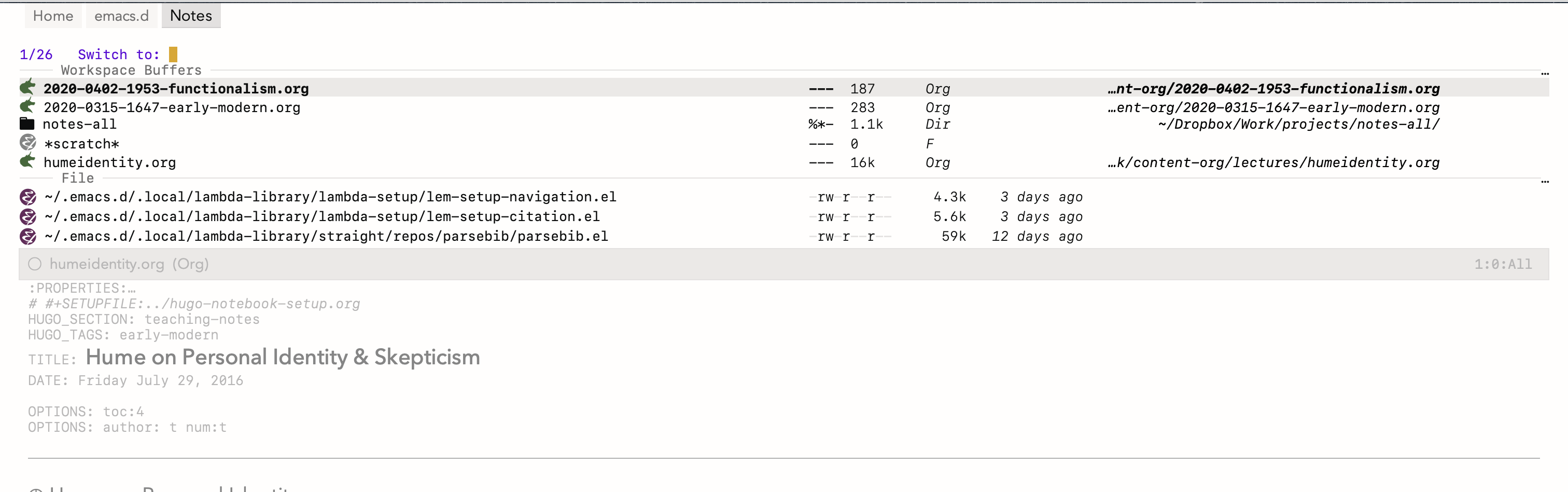
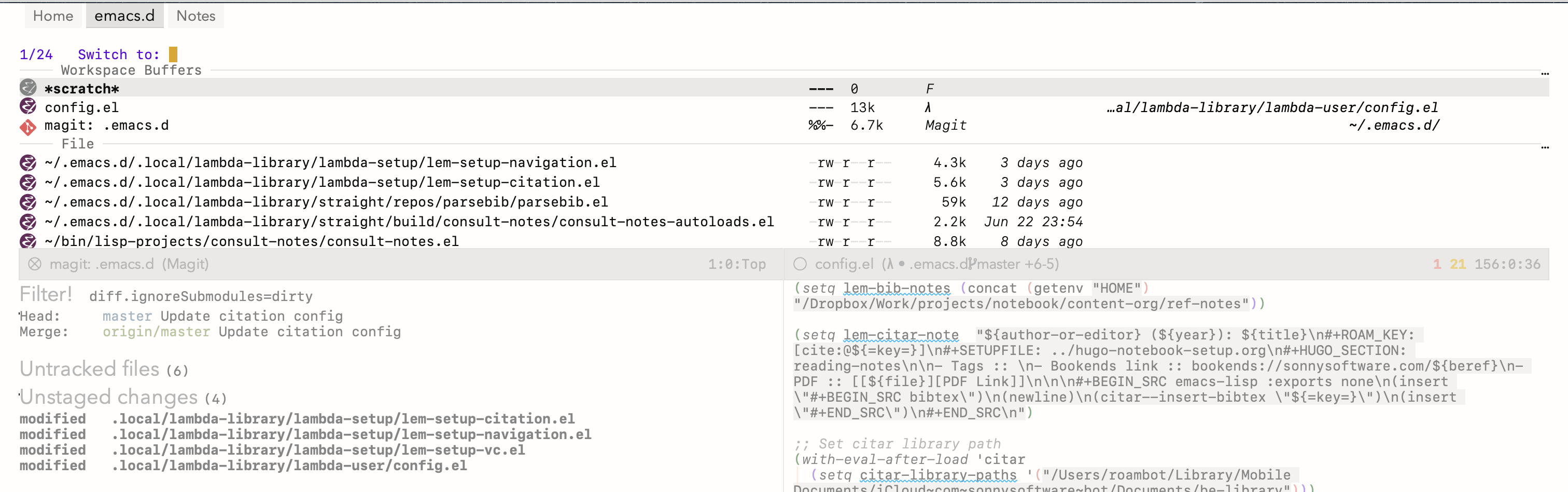
Here are some screenshots of tabspaces (with my lambda-themes) and using consult-buffer (see below for instructions on that setup). You can see the workspace isolated buffers in each and the tabs at top:
2. Installation
Tabspaces is available from NonGNU ELPA, which is enabled by default in Emacs 28
and later, so M-x package-install RET tabspaces RET works out of the box. It
is also on MELPA, or you can clone this repo and add it to your load-path.
If you have both archives enabled, note that package.el prefers MELPA's
date-stamped snapshot versions (for example 20260801.1200) over NonGNU ELPA's
release versions (for example 1.10.0), so MELPA wins by default. To install
the reviewed NonGNU ELPA release instead, give it priority:
(setq package-archive-priorities '(("nongnu" . 10)))
3. Setup
Here's one possible way of setting up the package using use-package (and straight, if you use that).
(use-package tabspaces
  ;; use this next line only if you also use straight, otherwise ignore it.
  :straight (:type git :host github :repo "mclear-tools/tabspaces")
  :hook (after-init . tabspaces-mode) ;; use this only if you want the minor-mode loaded at startup.
  :commands (tabspaces-switch-or-create-workspace
             tabspaces-open-or-create-project-and-workspace)
  :custom
  (tabspaces-use-filtered-buffers-as-default t)
  (tabspaces-default-tab "Default")
  (tabspaces-remove-to-default t)
  (tabspaces-include-buffers '("*scratch*"))
  (tabspaces-initialize-project-with-todo t)
  (tabspaces-todo-file-name "project-todo.org")
  ;; sessions
  (tabspaces-session t)
  (tabspaces-session-auto-restore t)
  ;; additional options
  (tabspaces-fully-resolve-paths t)  ; Resolve relative project paths to absolute
  (tabspaces-exclude-buffers '("*Messages*" "*Compile-Log*"))  ; Additional buffers to exclude
  (tab-bar-new-tab-choice "*scratch*"))

;; Optional: treat plain directories containing a .project file as
;; projects, so they work with tabspaces without version control.
;; See the "Non-VC Projects" section below.
;; (setq project-vc-extra-root-markers '(".project"))
Note the inclusion of the `tab-bar` setting, which is built-in to Emacs and allows a number of different options for what buffer to set for a newly created tab.
3.1. Keybindings
Workspace Keybindings are defined in the following variable:
(defvar tabspaces-command-map
  (let ((map (make-sparse-keymap)))
    (define-key map (kbd "C") 'tabspaces-clear-buffers)
    (define-key map (kbd "b") 'tabspaces-switch-to-buffer)
    (define-key map (kbd "d") 'tabspaces-close-workspace)
    (define-key map (kbd "k") 'tabspaces-kill-buffers-close-workspace)
    (define-key map (kbd "n") 'tabspaces-rename-workspace)
    (define-key map (kbd "o") 'tabspaces-open-or-create-project-and-workspace)
    (define-key map (kbd "r") 'tabspaces-remove-current-buffer)
    (define-key map (kbd "R") 'tabspaces-remove-selected-buffer)
    (define-key map (kbd "s") 'tabspaces-switch-or-create-workspace)
    (define-key map (kbd "t") 'tabspaces-switch-buffer-and-tab)
    (define-key map (kbd "w") 'tabspaces-show-workspaces)
    (define-key map (kbd "T") 'tabspaces-toggle-echo-area-display)
    map)
  "Keymap for tabspace/workspace commands after `tabspaces-keymap-prefix'.")
The variable tabspaces-keymap-prefix sets a key prefix (default is C-c TAB) for
the keymap, but this can be changed to anything the user prefers. The value is a
key sequence, e.g. (kbd "C-c w"); plain strings in kbd syntax like "C-c w"
are also accepted for backward compatibility. Set it to nil to disable
automatic keymap binding entirely.
Note on key conflicts: If you want to use C-x TAB as the prefix, be aware that
in terminal Emacs, TAB and C-i are indistinguishable. However, in GUI Emacs,
C-x TAB and C-x C-i are separate keybindings, so you can use C-x TAB for
tabspaces while keeping C-x C-i for indent-rigidly.
3.2. Buffer Filtering
When tabspaces-mode is enabled use tabspaces-switch-to-buffer to choose from a
filtered list of only those buffers in the current tab/workspace. Though nil by
default, when tabspaces-use-filtered-buffers-as-default is set to t and
tabspaces-mode is enabled, switch-to-buffer is globally remapped to
tabspaces-switch-to-buffer, and thus only shows those buffers in the current
workspace. For use with consult-buffer, see below.
3.3. Switch Tabs via Buffer
Sometimes the user may wish to switch to some open buffer in a tabspace and switch to that tab as well. Use (=tabspaces-switch-buffer-and-tab) to achieve this. If the buffer is open in more than one tabspace the user will be prompted to choose which tab to switch to. If there is no such buffer user will be prompted on whether to create it in a new tabspace or the current one.
3.4. Tabs & Projects
The tabspaces-open-or-create-project-and-workspace function provides a
versatile way to manage projects and their associated workspaces in
Emacs. Here's what you can do with it:
- Open Existing Projects: Open an existing project in its own workspace. The function will switch to the project's tab if it already exists.
- Create New Projects: If no such project exists at the specified
path, it will create one in its own workspace for you, initializing
version control (git or other VCS) in the process. Set
tabspaces-initialize-project-with-vctonilto skip version control and drop a.projectmarker file instead (see Non-VC Projects below). - Descriptive Tab Naming:
- Tabs are named descriptively based on the project structure.
- In case of naming conflicts, it intelligently renames tabs to avoid confusion.
- Multiple Tabs for the Same Project:
- By using a universal argument (C-u) before calling the function, you can force the creation of a new tab even for already open project tabs.
- The first tab will have the original project name.
- Subsequent tabs will be automatically named with incrementing numbers (e.g., "ProjectName<2>", "ProjectName<3>").
- This is useful when you want to work on different aspects of the same project in separate workspaces.
3.5. Tab-Anchored Project Context
With tabspaces-mode enabled, project.el commands issued from a buffer
that belongs to no project (e.g. *scratch*, or an org file elsewhere on
disk) fall back to the current tab's project rather than prompting. A
buffer that is itself inside a project keeps its own project; the tab
never overrides it. This means project-find-file and friends stay in
context no matter which buffer happens to be selected in a project
workspace. Set tabspaces-project-fallback-to-tab to nil to disable.
3.6. Renaming Workspaces
Rename the current workspace with tabspaces-rename-workspace (bound to
n in the command map). This is the stock tab-bar-rename-tab under the
hood, but while tabspaces-mode is enabled any tab rename (including
via tab-bar-rename-tab directly) also updates tabspaces' internal
project-to-tab bookkeeping, so per-project session saving keeps
tracking the renamed tab.
3.7. Project Switching via project.el
By default, tabspaces provides its own project-switch entry point
(tabspaces-open-or-create-project-and-workspace) and leaves the stock
project-switch-project (C-x p p) untouched. If you prefer a single
entry point, set:
(setq tabspaces-project-switch-opens-workspace t)
before enabling tabspaces-mode. The stock C-x p p then routes through
tabspaces, creating or reusing the project's workspace.
3.8. Non-VC Projects
Tabspaces works with any directory project.el recognizes, version controlled or not. To use plain directories as projects, tell project.el what marks a project root:
(setq project-vc-extra-root-markers '(".project"))
Workspaces, tab naming, and per-project sessions all work for such
marker-only projects. When creating a new project through tabspaces,
tabspaces-initialize-project-with-vc controls what happens: t (the
default) initializes version control via magit or vc; nil writes an
empty .project marker file instead.
3.9. Persistent Tabspaces
Tabspaces provides basic functionality to save and restore both global (all tabspaces) and project-specific tabspace sessions. These sessions store:
- Open file-visiting buffers in each tab
- Dired, eshell, shell, vterm, and eat buffers (via the built-in handlers; vterm and eat restore only when the respective package is installed). See Non-file Buffer Restoration below for the hook to add other kinds such as term or ielm.
- Window configurations (splits, sizes, buffer positions)
3.9.1. Configuration
By default, project sessions are stored in their respective project root
directories as hidden files (e.g. .{project-basename}-tabspaces-session.el). So for a project at /home/user/myproject/, the session file would be .myproject-tabspaces-session.el.
You can configure where project sessions are stored using
tabspaces-session-project-session-store:
;; Store in project directories (default)
(setq tabspaces-session-project-session-store 'project)

;; Store all project sessions in a specific directory
(setq tabspaces-session-project-session-store "~/.emacs.d/tabspaces-sessions/")

;; Use a custom function to determine location
(setq tabspaces-session-project-session-store
      (lambda (project-root)
        (expand-file-name
         (concat "sessions/" (file-name-nondirectory project-root) "-tabspaces-session.el")
         project-root)))
The global session file location is controlled by
tabspaces-session-file (defaults to ~/.emacs.d/tabsession.el).
3.9.2. Usage
- Global Sessions
Save all tabs and their configurations:
M-x tabspaces-save-session
Restore saved global session:
M-x tabspaces-restore-session
- Project Sessions
Save current project tab and its configuration:
M-x tabspaces-save-current-project-session
Restore sessions contextually:
;; When in a project tab (with per-project storage enabled):
M-x tabspaces-restore-session  ; Restores current project's session

;; When in a non-project tab:
M-x tabspaces-restore-session  ; Restores global session

;; Explicitly restore a specific project:
(tabspaces-restore-session "/path/to/project")
- Automatic Session Handling
Enable automatic session saving on Emacs exit:
(setq tabspaces-session t) ; Save sessions automatically
Sessions are saved on exit via
kill-emacs-hook. To also save periodically while Emacs idles (so a crash or killed process loses at most the changes since the last idle period), set an idle delay in seconds:(setq tabspaces-session-auto-save-delay 300) ; Save after 5 idle minutes
The default is
nil(save on exit only). Capturing window configurations briefly cycles through the tabs, so very short delays are not recommended.Control automatic session restoration:
;; Auto-restore sessions on startup and when opening projects
(setq tabspaces-session-auto-restore t)

;; Disable auto-restore (sessions must be manually restored)
(setq tabspaces-session-auto-restore nil)
When
tabspaces-session-auto-restoreist:- Global sessions are restored on Emacs startup
- Project sessions are restored when opening projects (if per-project storage is enabled)
When
tabspaces-session-auto-restoreisnil:- No automatic restoration occurs
- Use
M-x tabspaces-restore-sessionto manually restore sessions - The command is context-aware: restores project session when in a project tab, global session otherwise
Session support for saving tabspaces across Emacs sessions has been implemented. Setting
tabspaces-sessiontotensures that all open tabspaces and file-visiting buffers are saved. Sessions can be restored interactively via(tabspaces-restore-session), which is context-aware and will restore the current project's session when called from a project tab, or the global session otherwise. Automatic restoration is controlled bytabspaces-session-auto-restore: when set tot, sessions are restored on startup and when opening projects; whennil, all restoration is manual. Project sessions can be saved individually via(tabspaces-save-current-project-session)and are stored either in project directories or a central location based ontabspaces-session-project-session-store. - Advanced Session Management
For more granular control over session management, additional functions are available:
;; Save all project tabs to their individual session files
(tabspaces-save-all-project-sessions)

;; Save only non-project tabs to the global session file
(tabspaces-save-non-project-tabs)
These functions are particularly useful when using per-project session storage mode, allowing you to selectively save different types of workspaces.
- Non-file Buffer Restoration
In addition to file-visiting buffers, tabspaces ships handlers that save and restore
dired,eshell,shell,vterm, andeatbuffers as part of a session. The vterm and eat handlers load their package lazily on restore and skip the record (with a message) when the package is not installed, so tabspaces itself does not depend on any third-party terminal package. For other buffer kinds (term,ielm, etc.) tabspaces exposes a small registration API so users can wire up the kinds they care about in their own config.The save-side handler captures
default-directoryand the buffer name. The restore-side handler creates a fresh buffer at the saved directory. Running processes are not revived. A restored shell starts a new process, and a restored eshell starts a new eshell. Histories and output are not preserved.- Registration API
(tabspaces-register-buffer-kind KIND SAVE-FN RESTORE-FN)
KINDis a symbol used as the:kindvalue in serialized records.SAVE-FNtakes a buffer and returns either a plist of the form(:kind KIND :dir DIR :name NAME ...)ornilto skip the buffer. Add any extra keys your restore-fn needs.RESTORE-FNtakes such a plist and returns the buffer it created or reused, ornilto skip the record.
Re-registering a
KINDreplaces the previous entry. The most recently registered handler runs first on save. The five built-ins (dired,eshell,shell,vterm,eat) are registered at package load time and act as fallbacks. Restore-fn bodies must create buffers but must not call window-configuration-changing functions likepop-to-buffer-other-windowordelete-other-windows. The outer restore loop wraps each record's handler insave-window-excursionand then callswindow-state-putto set the final layout.TRAMP paths are handled at the dispatch layer (skipped with a summary message), so handlers do not need their own remote-path checks. For worked examples of the handler shape, see More example handlers below; the built-in vterm and eat handlers in
tabspaces.elare also good templates. - Registering after
(require 'tabspaces)
Register at top level, not inside
(with-eval-after-load 'THIRD-PARTY ...). Iftabspaces-session-auto-restoreist,tabspaces-mode 1triggers a restore immediately on startup. If a handler is wrapped in(with-eval-after-load 'THIRD-PARTY ...)the registration has not yet fired when the restore runs, and its records are reported as unknown kinds (single summary message) and skipped. Loading the third-party package later runs the registration, but the records are already gone from the session.For the same reason, all handler registrations must run before the call to
(tabspaces-mode 1)when auto-restore is enabled. Users ofuse-packagewith:defer tblocks should be especially careful here: puttabspaces-register-buffer-kindcalls at top level (or inside a:configblock on tabspaces itself), not inside a deferred block for the third-party package being registered.The canonical pattern (used by the built-in vterm and eat handlers) puts the
requireinside the restore-fn body, so the third-party package loads only when a record of that kind is actually being restored. For users whose package is not pre-compiled, the first restore pays the one-time package-load cost. - Caveats
- Cross-tab name collisions: per-tab dedup wins over name preservation.
If two tabs each saved a buffer named
*eshell*, restoring the second tab's eshell creates a fresh buffer (typically with a<N>suffix) so workspace isolation is maintained. - TRAMP: remote paths are skipped on restore with a summary message ("tabspaces: N remote buffer(s) skipped (TRAMP)") rather than connecting synchronously per buffer. Re-open remote buffers manually after restore.
- Shell semantics: restored shell-mode buffers are fresh processes at
the saved
default-directory. No command history is preserved, and no running state is revived. Users with named shells like*shell-prod*who depend on history should know the restored buffer starts empty. - Single-frame restore:
tabspaces-restore-sessiondrives the current frame's tabs. Calling it on a second frame performs a second full restore. The dedup check sees the first frame's buffers as foreign and creates fresh ones. - One-way backward compat: session files written by this version include plist records that older versions cannot read. Downgrading requires deleting any saved session files first.
- Cross-tab name collisions: per-tab dedup wins over name preservation.
If two tabs each saved a buffer named
- More example handlers
;; term-mode (and ansi-term) -- spawns a PTY at the saved directory.
(tabspaces-register-buffer-kind
 'term
 (lambda (b)
   (with-current-buffer b
     (when (derived-mode-p 'term-mode)
       (list :kind 'term
             :dir default-directory
             :name (buffer-name)))))
 (lambda (rec)
   (let ((name (plist-get rec :name))
         (dir  (plist-get rec :dir)))
     (or (tabspaces-reuse-existing-buffer name)
         (condition-case err
             (let* ((default-directory dir)
                    (program (or explicit-shell-file-name
                                 (getenv "SHELL")
                                 shell-file-name)))
               ;; ansi-term wraps make-term with a user-provided buffer
               ;; name, sidestepping (term)'s hardcoded *terminal* name.
               (ansi-term program (substring name 1 -1)))
           (error
            (message "tabspaces: term restore skipped (%s): %S" dir err)
            nil))))))

;; ielm -- Emacs Lisp REPL.  `ielm' did not accept a BUF-NAME argument
;; until Emacs 29.1, so call it with no args and rename the resulting
;; buffer when the saved name is free.
(tabspaces-register-buffer-kind
 'ielm
 (lambda (b)
   (with-current-buffer b
     (when (derived-mode-p 'inferior-emacs-lisp-mode)
       (list :kind 'ielm
             :dir default-directory
             :name (buffer-name)))))
 (lambda (rec)
   (let ((name (plist-get rec :name))
         (dir  (plist-get rec :dir)))
     (or (tabspaces-reuse-existing-buffer name)
         (condition-case err
             (let ((default-directory dir))
               (ielm)
               (let ((buf (current-buffer)))
                 (when (and buf
                            (not (equal name (buffer-name buf)))
                            (not (get-buffer name)))
                   (with-current-buffer buf (rename-buffer name)))
                 buf))
           (error
            (message "tabspaces: ielm restore skipped (%s): %S" dir err)
            nil))))))
- Registration API
3.10. Additional Customization
3.10.1. Echo Area Display
Tabspaces can optionally display tabs in the echo area (bottom of the frame) instead of the top tab-bar. This feature provides a less visually prominent way to show workspace information.
;; Enable echo area tab display
(setq tabspaces-echo-area-enable t)

;; Customize idle delay (default is 1.0 seconds)
(setq tabspaces-echo-area-idle-delay 5.0)

;; Customize the format function (advanced users)
(setq tabspaces-echo-area-format-function #'my-custom-tab-formatter)

;; Toggle echo area display (bound to C-c TAB T by default)
(tabspaces-toggle-echo-area-display)

;; Troubleshooting functions
(tabspaces-restart-idle-timer)      ; Restart the idle timer if display stops working
(tabspaces-echo-area-timer-status)  ; Check timer status for debugging
When enabled, this feature:
- Hides the visual tab-bar at the top of the frame
- Shows formatted tabs in the echo area after the configured idle time
- Does not displace other messages or minibuffer content
- Filters duplicate messages from the
*Messages*buffer to reduce clutter - Maintains compatibility with existing tab-bar formatters and themes
- Respects your existing tab-bar format configuration
The echo area display respects your existing tab formatting configuration and works seamlessly with features like SF Symbols for tab numbering.
You can also display workspaces in the echo area on demand using:
;; Show workspaces immediately (bound to C-c TAB w by default)
(tabspaces-show-workspaces)
This command shows all workspaces in the echo area without waiting for idle time or enabling the automatic display feature.
3.10.2. Buffer Management Integration
Tabspaces provides a minimal API for integrating with buffer management and completion frameworks. Rather than implementing tool-specific features, the package exposes workspace primitives that work with any completion system or buffer management tool.
Integration API:
The following functions form the public integration points:
(tabspaces-local-buffer-list &optional frame)- Returns the buffers in the current workspace. This is the recommended entry point, and is a suitable value for consult'sconsult-buffer-list-function.(tabspaces--list-tabspaces)- Returns list of all workspace names(tabspaces--buffer-list &optional frame tabnum)- Returns buffers for a workspace- With no arguments: buffers in current workspace
- With
tabnum: buffers in specific workspace by index
(tabspaces--current-tab-name)- Returns current workspace name(tabspaces--local-buffer-p buffer)- Predicate testing if buffer belongs to current workspace
Prefer tabspaces-local-buffer-list, which is the only one of these named as public. It differs from tabspaces--buffer-list in also honoring tabspaces-include-buffers and tabspaces-exclude-buffers. The others use the -- prefix (typically indicating internal functions) but form the stable integration API. They are available once the package is loaded, for instance after enabling tabspaces-mode.
A workspace contains every buffer displayed in the tab and every buffer buried in it. Burying, which is what quit-window and q do, hides a buffer inside its workspace without removing it. Removal is tabspaces-remove-buffer, bound to C-c TAB r, which takes the buffer out of the workspace entirely.
Below are integration examples for popular frameworks.
- Consult
If you have consult installed, point its buffer list at the workspace:
(setq consult-buffer-list-function #'tabspaces-local-buffer-list)
That one setting isolates every consult source that lists buffers. Narrowing with "b" gives the workspace buffers, and narrowing with "o" gives the buffers in other tabs, via
consult-source-other-buffer, which consult enables automatically as soon asconsult-buffer-list-functionis customized.Consult also offers
consult--frame-buffer-list, which reads the same two frame parameters tabspaces uses. Prefertabspaces-local-buffer-listover it, because it additionally honorstabspaces-include-buffers. That matters more than it sounds:tabspaces-reset-buffer-listruns only when a tab is created and only ever removes buffers, so an include-buffer that comes into existence later, in some other tab, never enters an existing tab's frame list. Entries people actually put in that variable, such as*Org Agenda*or*compilation*, are typically created mid-session.NOTE:
consult-buffer-list-functionis global to consult rather than local toconsult-buffer. It also narrowsconsult-project-buffer;consult-line-multi, including theC-uvariant that is meant to search every buffer; and the recent-file deduplication that hides files you already have open, so files open in other tabs will reappear as recent-file candidates. Two sources deliberately stay global and are unaffected:consult-source-hidden-bufferon SPC, and the "other buffers" half ofconsult-source-other-buffer. No single narrowing key lists every buffer any more. If you want one back, add a source with:buffer-list t.NOTE:
consult-buffer-list-functionrequires consult 2.7 or later. Consult 2.9 and later require Emacs 29, while tabspaces itself supports Emacs 27.1.If you toggle
tabspaces-modeon and off, restore the default when it is off:(defun my--consult-tabspaces () "Isolate consult's buffer list only while tabspaces is active." (setq consult-buffer-list-function (if tabspaces-mode #'tabspaces-local-buffer-list #'buffer-list))) (add-hook 'tabspaces-mode-hook #'my--consult-tabspaces)- A separate narrowing category
If you would rather keep workspace buffers in their own source, leaving the rest of consult untouched, use a custom source instead of the setting above. This is also the option to choose if you want isolation confined to
consult-bufferand nowhere else:;; Filter Buffers for Consult-Buffer (with-eval-after-load 'consult ;; hide full buffer list (still available with "b" prefix) (plist-put consult-source-buffer :hidden t) (plist-put consult-source-buffer :default nil) ;; set consult-workspace buffer list (defvar consult--source-workspace (list :name "Workspace Buffers" :narrow ?w :history 'buffer-name-history :category 'buffer :state #'consult--buffer-state :default t :items (lambda () (consult--buffer-query :predicate #'tabspaces--local-buffer-p :sort 'visibility :as #'buffer-name))) "Set workspace buffer list for consult-buffer.") (add-to-list 'consult-buffer-sources 'consult--source-workspace))This shows workspace buffers by default and all buffers when narrowing with "b". As written it needs consult 3.0 or later, where
consult--source-bufferbecameconsult-source-buffer; on older versions use the double-dash name.NOTE: We use
plist-putto modifyconsult-source-bufferdirectly rather thanconsult-customize. Theconsult-customizemacro validates its arguments at expansion time, which can fail depending on load order and byte-compilation state (see #76 and consult#345). Usingplist-putavoids this issue entirely.NOTE: With this recipe, narrowing with "p" still shows all project buffers across tabs, since it leaves the other consult sources alone.
NOTE: If you typically toggle between having
tabspaces-modeactive and inactive, you may want to include a hook function to turn off theconsult--source-workspaceand modify the visibility ofconsult-source-buffer:(defun my--consult-tabspaces () "Deactivate isolated buffers when not using tabspaces." (require 'consult) (cond (tabspaces-mode ;; hide full buffer list (still available with "b") (plist-put consult-source-buffer :hidden t) (plist-put consult-source-buffer :default nil) (add-to-list 'consult-buffer-sources 'consult--source-workspace)) (t ;; reset consult-buffer to show all buffers (plist-put consult-source-buffer :hidden nil) (plist-put consult-source-buffer :default t) (setq consult-buffer-sources (remove #'consult--source-workspace consult-buffer-sources))))) (add-hook 'tabspaces-mode-hook #'my--consult-tabspaces)
- A separate narrowing category
- Ivy
If you use ivy you can use this function to limit your buffer search to only those in the tabspace:
(defun tabspaces-ivy-switch-buffer (buffer)
  "Display the local buffer BUFFER in the selected window.
This is the frame/tab-local equivilant to `switch-to-buffer'."
  (interactive
   (list
    (let ((blst (mapcar #'buffer-name (tabspaces--buffer-list))))
      (read-buffer
       "Switch to local buffer: " blst nil
       (lambda (b) (member (if (stringp b) b (car b)) blst))))))
  (ivy-switch-buffer buffer))
Alternatively, you may use the following function, which is basically a clone of
ivy-switch-buffer(and thus uses ivy's own implementation framework), but with an additional predicate that only allows showing buffers from the current tabspace:(defun tabspaces-ivy-switch-buffer () "Switch to another buffer in the current tabspace." (interactive) (ivy-read "Switch to buffer: " #'internal-complete-buffer :predicate (when (tabspaces--current-tab-name) (let ((local-buffers (tabspaces--buffer-list))) (lambda (name-and-buffer) (member (cdr name-and-buffer) local-buffers)))) :keymap ivy-switch-buffer-map :preselect (buffer-name (other-buffer (current-buffer))) :action #'ivy--switch-buffer-action :matcher #'ivy--switch-buffer-matcher :caller 'ivy-switch-buffer)) - ibuffer
To integrate with ibuffer, use hooks to create workspace-based filter groups:
(defun my-tabspaces-ibuffer-group ()
  "Group ibuffer entries by tabspace."
  (setq ibuffer-filter-groups
        (mapcar (lambda (tab)
                  (let ((tab-index (tab-bar--tab-index-by-name tab)))
                    (cons tab
                          `((predicate . (member (buffer-name)
                                                (mapcar #'buffer-name
                                                        (tabspaces--buffer-list nil ,tab-index))))))))
                (tabspaces--list-tabspaces))))

(add-hook 'ibuffer-hook #'my-tabspaces-ibuffer-group)
This automatically organizes ibuffer by workspace whenever you open it. You can customize the grouping logic by modifying the filter predicate.
To jump from an ibuffer entry to the tab containing that buffer, use
tabspaces-ibuffer-switch-buffer-and-tab. Bind it in ibuffer's keymap:(with-eval-after-load 'ibuffer (define-key ibuffer-mode-map (kbd "o") #'tabspaces-ibuffer-switch-buffer-and-tab))
3.10.3. Included Buffers
By default the *scratch* buffer is included in all workspaces. You can modify
which buffers are included by default by changing the value of
tabspaces-include-buffers.
If you want emacs to startup with a set of initial buffers in a workspace (something I find works well) you could do something like the following:
(defun my--tabspace-setup ()
  "Set up tabspace at startup."
  ;; Add *Messages* and *splash* to Tab \`Home\'
  (tabspaces-mode 1)
  (progn
    (tab-bar-rename-tab "Home")
    (when (get-buffer "*Messages*")
      (set-frame-parameter nil
                           'buffer-list
                           (cons (get-buffer "*Messages*")
                                 (frame-parameter nil 'buffer-list))))
    (when (get-buffer "*splash*")
      (set-frame-parameter nil
                           'buffer-list
                           (cons (get-buffer "*splash*")
                                 (frame-parameter nil 'buffer-list))))))

(add-hook 'after-init-hook #'my--tabspace-setup)
3.10.4. File Per Project
By default Tabspaces will create a project-todo.org file at the root of the project
when creating a new workspace using tabspaces-open-or-create-project-and-workspace.
Use tabspaces-todo-file-name to change the name of that file, or tabspaces-initialize-project-with-todo
to disable this feature completely.
4. Alternatives
Emacs workspace packages differ mainly in what they scope buffers to and in how much machinery they bring along. This sketch describes each package's model; see their manuals for current details.
- perspective
- Named workspaces, each with its own buffer list and window layout. Perspectives live per frame and you switch between them by name. State can be saved to and restored from disk.
- persp-mode
- The same named-workspace idea, with perspectives shared across frames and its own session save and restore.
- beframe
- Scopes buffers to frames, with the frame as the unit of work.
- bufferlo
- Like tabspaces, attaches local buffer lists to frames and tabs through the built-in buffer-list parameters. It stays agnostic about projects and persists tabs and frames via the bookmark system.
- activities
- Task-oriented "activities" layered over tab-bar or frames, with suspend and resume across sessions built on bookmarks. Persistence and task switching are its emphasis.
- project-x
- Extends project.el with per-project session saving, extra root markers, and an optional tab mode. It overlaps with tabspaces' project sessions while staying closer to plain project.el.
Tabspaces sits at the intersection of tabs and projects: each tab-bar tab holds an isolated buffer list, tabs map to project.el projects (which need not be under version control; any directory project.el recognizes through root markers works), and sessions can be saved globally or per project. If you want one tab per project with the built-in libraries doing the work, that is the gap this package fills.
5. Development
I develop tabspaces with help from Claude Code, chiefly for bug-hunting,
code review, and the test suite. I review every change before it lands,
and AI-assisted commits carry an Assisted-by trailer in their commit
messages.
6. Acknowledgments
Code for this package is derived from, or inspired by, a variety of sources. These include:
- The original buffer filter function
- Buffer filtering and removal
- Consult integration
Old versions
| tabspaces-1.10.1.tar.lz | 2026-Aug-05 | 42.2 KiB |
| tabspaces-1.10.0.tar.lz | 2026-Aug-02 | 40.9 KiB |