 NonGNU ELPA: org-history
org-history 
- Description
- Show Dates for Org headers from vcs + auto-commit
- Latest
- org-history-0.5.2.tar (.sig), 2026-Aug-13, 110 KiB
- Maintainer
- Other versions:
- development version
- Website
- https://codeberg.org/Anoncheg/emacs-org-history
- ELPA's Repository
- CGit or Gitweb
To install this package from Emacs, use package-install or list-packages.
Full description


1. org-history
Track and display modification dates automatically in `org-mode` buffers with this minor mode.
It uses Git version control to make automatic commits whenever you save a buffer (per-day with –amend).
A special feature allows auto-enabling the mode for current opened file in current directory by using `.dir-locals.el`, removing the need to manually list tracked files.
Version: 0.5.2
2. How this works?
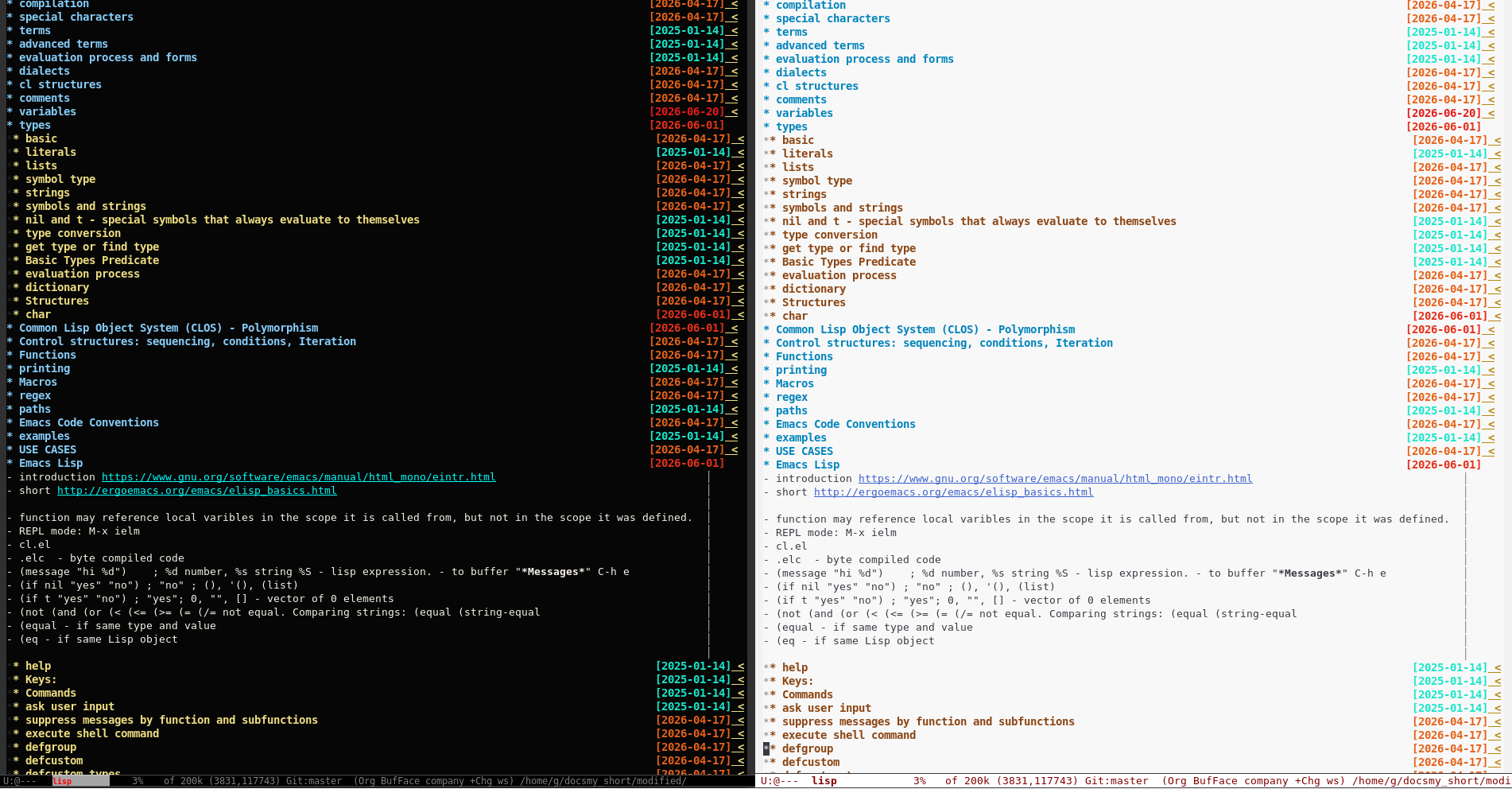
For every visible header, we get a range of line numbers like 21-34; from .git/, we get the last modification in this range.
We put a read-only overlay on the last character of the Org header with the date.
We accurately do "git commit –amend" if the current day is the day of the last commit with the "org-history" message, or just add a new commit.
When saving, we check .dir-locals.el to see if there is a record for the current file and if .git exists. If not, we ask the user and add the line:
("subfolder-maybe/current-file" (org-mode (mode . org-history)))
Which checks 1) the path of the file relative to the Git directory 2) Org mode for the buffer.
3. Features
- Automatically commits buffer changes to a per-file Git repository in the background (using `–amend` to group daily changes)
- Prompts for confirmation only once per file
- Efficient performance even with large files, thanks to caching and asynchronous Git operations
4. Installation
4.1. MELPA
M-x package-install RET org-history RET
4.2. Manual
Clone the repository and add it to your `load-path`:
(add-to-list 'load-path "/path/to/emacs-org-history/")
(require 'org-history)
5. Activation:
Per file:
M-x org-history-mode
If you dont like using .dir-locals.el, you may disable this feature in ~/.emacs: (setopt org-history-dir-locals-flag nil)
Alternatively, enable it for specific folders using .dir-locals.el:
((org-mode . ((mode . org-history))))
6. Customization
M-x customize-group RET org-history
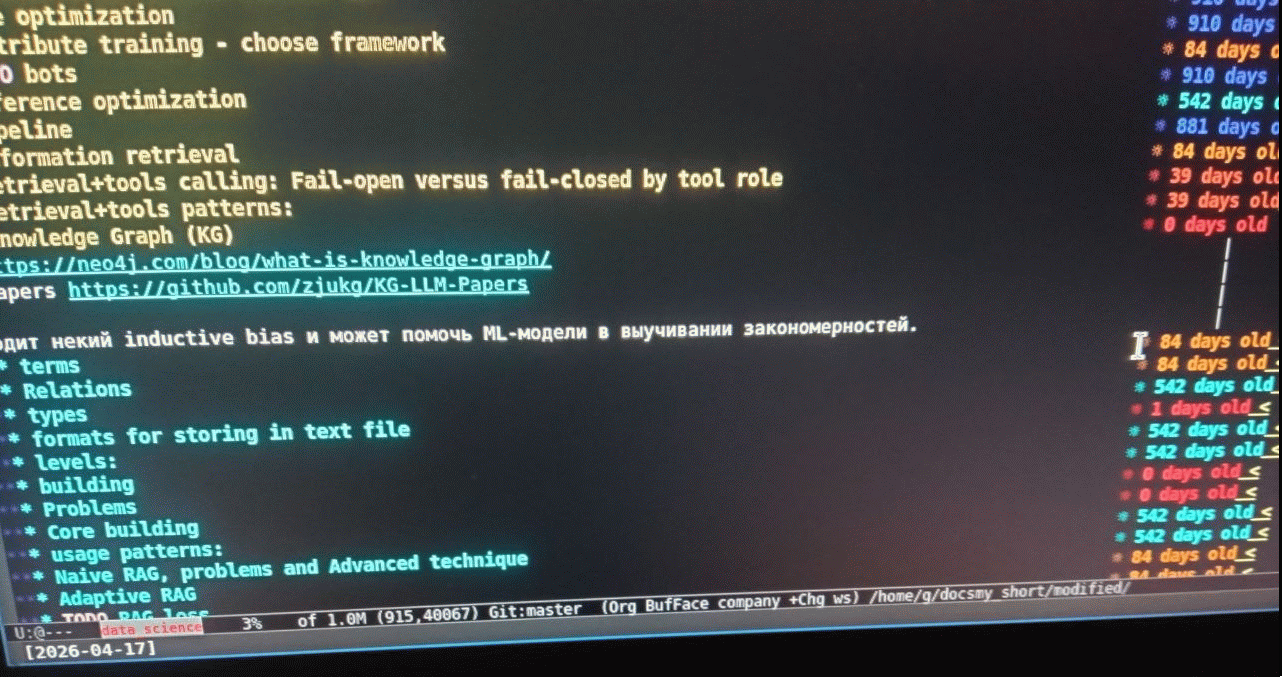
Try different format for date, add to ~/.emacs:
(setq org-history-outline-date-render-fn #'org-history-outline-default-render-daysold)
7. Hint
You may use C-h . at the end of header to get hint without using “mouse over” to see it.
8. Screenshot
 Alternative format, see above in Customization.
9. Check those packages if you like this one :)
| Description | URL |
|---|---|
| Navigation in Dired, Packages, Buffers modes | https://github.com/Anoncheg1/firstly-search |
| Search with Chinese | https://github.com/Anoncheg1/pinyin-isearch |
| Ediff fix | https://github.com/Anoncheg1/ediffnw |
| Dired history | https://github.com/Anoncheg1/dired-hist |
| Selected window highlighting | https://github.com/Anoncheg1/selected-window-contrast |
| Copy link to clipboard | https://github.com/Anoncheg1/emacs-org-links |
| Solution for "callback hell" | https://github.com/Anoncheg1/emacs-async1 |
| Restore buffer state | https://github.com/Anoncheg1/emacs-unmodified-buffer1 |
| outline.el usage | https://github.com/Anoncheg1/emacs-outline-it |
| Hiding password in cafe | https://github.com/Anoncheg1/emacs-hidepass |
| Call LLMs and agents from Org-mode cui blocks | https://github.com/Anoncheg1/emacs-cui |
10. Donate, sponsor the author
You can sponsor author crypto money directly with crypto currencies:
- BTC (Bitcoin) address: 1CcDWSQ2vgqv5LxZuWaHGW52B9fkT5io25

- USDT (Tether TRX-TRON) address: TVoXfYMkVYLnQZV3mGZ6GvmumuBfGsZzsN

- TON (Telegram) address: UQC8rjJFCHQkfdp7KmCkTZCb5dGzLFYe2TzsiZpfsnyTFt9D
11. Emacs built-in alternative
To see history for every line in buffer use Built-in Emacs command:
M-x vc-annotate
To auto-insert date or note right after Org header there is simple varible `org-log-done` in Org, that auto-insert timestamp or ask for note when you change state of Org heading to DONE.
To have auto-commits you may use something like this:
(defun my-git-commit-on-save ()
  "Automatically stage and commit/amend the current file on save."
  (interactive)
  (when (and buffer-file-name (vc-backend buffer-file-name))
    (let* ((file (shell-quote-argument buffer-file-name))
           ;; Get last commit date (YYYY-MM-DD) and subject line in one clean shell call
           (info (string-trim (shell-command-to-string (format "git log -1 --format=\"%%cs %%s\" -- %s" file))))
           (today (format-time-string "%F")))

      ;; Always stage the current file changes first
      (shell-command-to-string (format "git add %s" file))

      ;; If the last commit was made today AND started with "org-history", amend it
      (if (string-prefix-p (concat today " org-history") info)
          (progn
            (shell-command-to-string "git commit --amend --allow-empty --no-edit --date=now")
            (message "VC-Git: Amended today's commit."))
        ;; Otherwise, make a new commit
        (progn
          (shell-command-to-string "git commit -m \"org-history\"")
          (message "VC-Git: Created new commit."))))))

;; Attach to the save hook
(setq vc-git-annotate-switches '("-M"))  ; git blame with immune to change order of headers
(add-hook 'after-save-hook 'my-git-commit-on-save)
12. Note about .dir-locals.el format
Format of .dir-locals.el:
((MAJOR-MODE . ((VARIABLE . VALUE)
                (VARIABLE . VALUE)))
 ;; Comments allowed
 (SUBDIRECTORY-STRING . ((MAJOR-MODE . ((VARIABLE . VALUE)))))
 ;; List of variables may be just a single cons.
 (MAJOR-MODE . (VARIABLE . VALUE)))
It is exactly one alist.
Emacs provide Pseudo-Variables:
- eval
- Allow to run run arbitrary code:
(eval . (display-line-numbers-mode 1). When you use eval, Emacs's security gate kicks in. Because running arbitrary Elisp can be dangerous. - mode
- to activate mode
(mode . minor-mode-name), same as File-Local Variable. If you want to enable multiple minor modes, you must repeat the mode key on separate lines.
Examples of .dir-locals.el:
;;; Unified Project Configuration File
;;; Demonstrates all core features: modes, subdirs, minor modes, eval, and comments.

((nil . ((fill-column . 80)                     ; Aspect 1 & 2: Global variable for all modes
         (mode . hl-line)                       ; Aspect 4: Enable Highlight Line minor mode globally

         ;; Aspect 5: Dynamic execution via 'eval' to set a custom buffer-local variable
         (eval . (setq-local project-loaded-at (current-time-string)))))

 (python-mode . ((indent-tabs-mode . nil)       ; Aspect 2: Mode-specific variable override
                 (tab-width . 4)
                 (mode . display-line-numbers))) ; Aspect 4: Minor mode active only in Python

 ;; Aspect 3: Subdirectory scoping for anything under the "tests/" directory
 ("tests" . ((nil . ((fill-column . 100)))      ; Relax the line limit for test files
             (python-mode . ((mode . flycheck)))))) ; Enable Flycheck only for Python tests
Emacs also check for .dir-locals-2.el file.
By default, any variable defined in a .dir-locals.el applies to that directory and all of its subdirectories recursively. To prevent this:
((nil . ((subdirs . nil)          ; Disables inheritance for subdirectories
         (fill-column . 80))))
You may move .dir-locals.el settings to ~/.emacs this way:
;; 1. Define a "class" (a named bundle of settings)
(dir-locals-set-class-variables
 'my-javascript-project
 '((js-mode . ((js-indent-level . 2)))))

;; 2. Bind that class to a specific absolute directory path
(dir-locals-set-directory-class
 "/home/user/projects/web-app" 'my-javascript-project)
13. Contact & Support
Questions or issues?