 NonGNU-devel ELPA: nov
nov 
- Description
- Featureful EPUB reader mode
- Latest
- nov.tar (.sig), 2026-Jan-15, 1.14 MiB
- Maintainer
- Other versions:
- release version
- Website
- https://depp.brause.cc/nov.el
- ELPA's Repository
- CGit or Gitweb
- All Dependencies
- esxml (.tar)
- Badge

To install this package from Emacs, use package-install or list-packages.
Full description

About
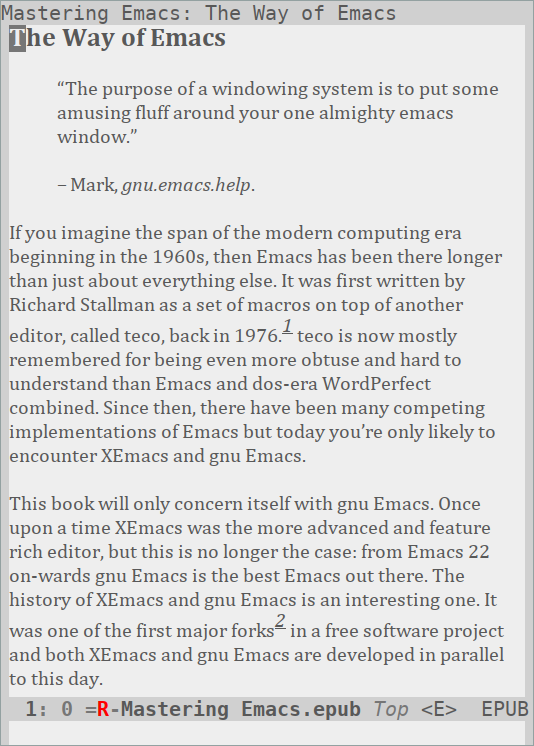
nov.el provides a major mode for reading EPUB documents.
Features:
- Basic navigation (jump to TOC, previous/next chapter)
- Remembering and restoring the last read position
- Jump to next chapter when scrolling beyond end
- Storing and following Org links to EPUB files
- Renders EPUB2 (.ncx) and EPUB3 (<nav>) TOCs
- Hyperlinks to internal and external targets
- Supports textual and image documents
- Info-style history navigation
- View source of document files
- Info-style incremental search
- Metadata display
- Image rescaling
Screenshot
Installation
Set up the [MELPA] or [MELPA Stable] repository if you haven't already
and install with M-x package-install RET nov RET.
Setup
By default, nov.el uses unzip on PATH to extract EPUB files. You
can customize nov-unzip-program if it is located elsewhere. You can
also customize nov-unzip-args if you use a different decompression
tool like bsdtar. It must accept a target directory where nov
unzips the EPUB filename.
(setq nov-unzip-program (executable-find "bsdtar")
      nov-unzip-args '("-xC" directory "-f" filename))
You'll also need an Emacs compiled with libxml2 support, otherwise
rendering will fail.
Put the following in your init file:
(add-to-list 'auto-mode-alist '("\\.epub\\'" . nov-mode))
Customization
While the defaults make for an acceptable reading experience, it can be improved with any of the following changes:
Default font
To change the default font, use M-x customize-face RET
variable-pitch, pick a different family, save and apply. If you
dislike globally customizing that face, add the following to your init
file:
(defun my-nov-font-setup ()
  (face-remap-add-relative 'shr-text :family "Liberation Serif"
                                     :height 1.0))
(add-hook 'nov-mode-hook 'my-nov-font-setup)
In Emacs versions older than 29.1, use the following helper function:
(defun my-nov-font-setup ()
  (face-remap-add-relative 'variable-pitch :family "Liberation Serif"
                                           :height 1.0))
To completely disable the variable pitch font, customize
nov-variable-pitch to nil. Text will be displayed with the
default face instead which should be using a monospace font.
Text width
By default text is filled by the window width. You can customize
nov-text-width to a number of columns to change that:
(setq nov-text-width 80)
It's also possible to set it to t to inhibit text filling, this can
be used in combination with visual-line-mode and packages such as
visual-fill-column to implement more flexible filling:
(setq nov-text-width t)
(setq visual-fill-column-center-text t)
(add-hook 'nov-mode-hook 'visual-line-mode)
(add-hook 'nov-mode-hook 'visual-fill-column-mode)
Rendering
In case you're not happy with the rendering at all, you can either use
nov-pre-html-render-hook and nov-post-html-render-hook to adjust
the HTML before and after rendering or use your own rendering function
by customizing nov-render-html-function to one that replaces HTML in
a buffer with something nicer than the default output.
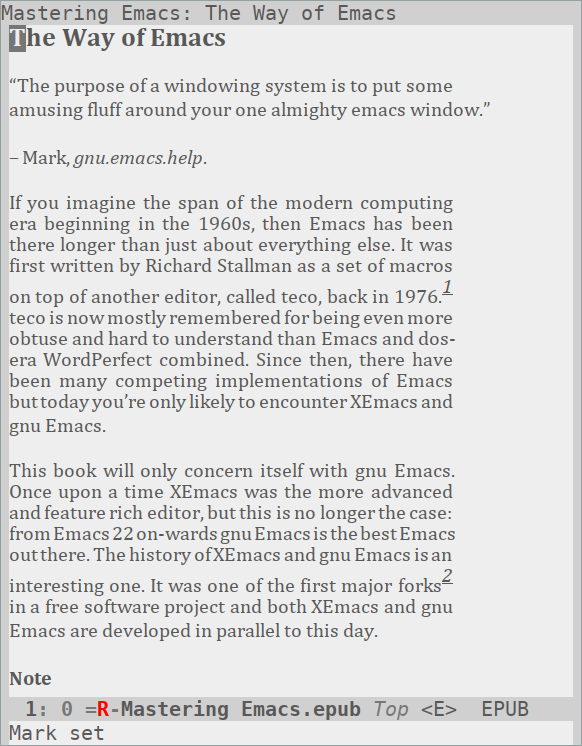
Here's an advanced example of text justification with the [justify-kp] package:
(require 'justify-kp)
(setq nov-text-width t)

(defun my-nov-window-configuration-change-hook ()
  (my-nov-post-html-render-hook)
  (remove-hook 'window-configuration-change-hook
               'my-nov-window-configuration-change-hook
               t))

(defun my-nov-post-html-render-hook ()
  (if (get-buffer-window)
      (let ((max-width (pj-line-width))
            buffer-read-only)
        (save-excursion
          (goto-char (point-min))
          (while (not (eobp))
            (when (not (looking-at "^[[:space:]]*$"))
              (goto-char (line-end-position))
              (when (> (shr-pixel-column) max-width)
                (goto-char (line-beginning-position))
                (pj-justify)))
            (forward-line 1))))
    (add-hook 'window-configuration-change-hook
              'my-nov-window-configuration-change-hook
              nil t)))

(add-hook 'nov-post-html-render-hook 'my-nov-post-html-render-hook)
This customization yields the following look:
Usage
Open the EPUB file with C-x C-f ~/novels/novel.epub, scroll with
SPC and switch chapters with n and p. More keybinds can be
looked up with F1 m.
Bugs
Invalid EPUB documents are not supported. Please use [epubcheck] to validate yours when running into an error.
In case the bug is specific to an EPUB document, please send attach it
to your email. I'll try my best to figure out the error, but chances
are you can figure it out as well by using the source view (bound to
v for the current document and V for the content file) to spot
the problematic XML.
Alternatives
The first one I've heard of is [epubmode.el] which is, well, see for yourself. You might find [ereader] more useful, especially if you're after Org integration and annotation support.
Old versions
| nov-0.5.0.0.20251213.150137.tar | 2026-Jan-15 | 1.14 MiB |